
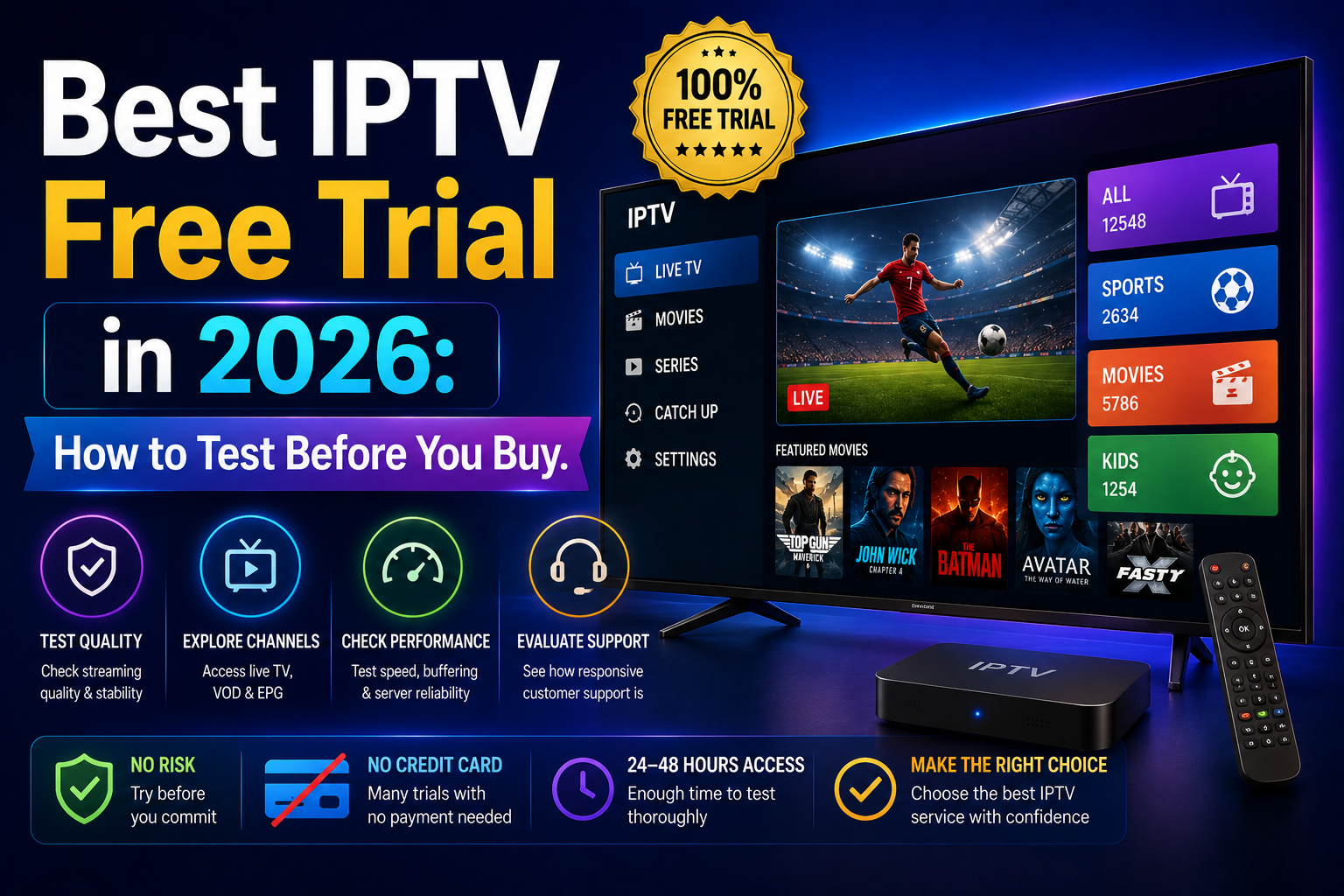
There is nothing quite as frustrating as settling into your living room on a Saturday evening, cracking open a cold drink, and tuning in for the big game only to spend the next two hours staring at a spinning loading wheel. If you have ever cut the cord on expensive cable and started exploring alternative streaming options, you know this pain all too well. Finding a solid streaming setup feels a bit like navigating the Wild West, which is why landing a legitimate iptv free trial before spending a single dollar is the absolute best way to protect your wallet and your sanity.
When I first started looking into internet-based television years ago, I fell into every trap imaginable. I paid upfront for six-month plans from flashy websites, only for the streams to freeze the moment peak evening viewing hours hit. Over time, I learned that the smartest way to evaluate any streaming server is to put it through a real-world stress test using a temporary trial period.
In this comprehensive guide, I am going to share everything I have learned from hands-on testing. We will walk through how to set up streams, how to evaluate server strength, how to spot subtle red flags, and how to optimize your home setup so you never get stuck with a dead service.
What Exactly Is an IPTV Free Trial and How Does It Work?
At its core, an iptv free trial is a short-term, temporary pass that gives you unrestricted access to a provider’s channel lineup, video-on-demand (VOD) catalog, and streaming infrastructure. Instead of requiring you to pay upfront for an annual or monthly plan, a provider grants you login credentials or a playlist link valid anywhere from 3 hours to 48 hours.
During this evaluation window, the server treats your connection just like a paying subscriber. You get to test live television feeds, scroll through the Electronic Program Guide (EPG), launch movies, and check how fast channels switch when you press a button on your remote.
                 +---------------------------------+
                 |  Request IPTV Free Trial        |
                 +---------------------------------+
                                  |
                                  v
                 +---------------------------------+
                 | Receive Xtream Codes / M3U Link |
                 +---------------------------------+
                                  |
                                  v
                 +---------------------------------+
                 |  Load Details into Player App   |
                 |  (TiviMate, IPTV Smarters, etc) |
                 +---------------------------------+
                                  |
                                  v
                 +---------------------------------+
                 |  Stress-Test During Peak Hours  |
                 +---------------------------------+
How Credentials Are Delivered
When you register for a trial, the service provider usually sends your access information via email or through a web portal. This information generally arrives in one of three formats:
- Xtream Codes API: The most user-friendly format consisting of three pieces of text: a Server URL (like
[http://provider-dns.com:8080](http://provider-dns.com:8080)), a Username, and a Password. - M3U Playlist URL: A long web address ending in
.m3uor.m3u8that points directly to the server’s playlist file. - MAC Address Registration: Used primarily for dedicated set-top boxes (like MAG devices) or portal-based apps (like Stalker Portal), where the provider whitelist your device’s unique MAC address.
How an IPTV Free Trial Differs From a Full Subscription
Understanding the structural differences between a temporary test and a paid account helps set realistic expectations:
| Feature / Aspect | IPTV Free Trial | Paid Subscription |
|---|---|---|
| Access Duration | 24 to 48 hours (sometimes up to 72 hours) | 1, 3, 6, or 12 months |
| Simultaneous Connections | Usually restricted to 1 active stream | 1 to 5 connections depending on plan |
| Setup Process | Instant or automated email setup | Account dashboard management |
| Channel Availability | Complete library or tailored test list | Unrestricted full package access |
| Financial Risk | Zero financial obligation | Non-refundable subscription cost |
Why You Should Never Buy a Subscription Without Testing First
If there is one golden rule in the streaming world, it is this: never buy an unverified long-term account without testing a live feed first.
A website can look sleek, professional, and trustworthy, with glowing testimonials and fancy graphic badges. However, the real infrastructure behind that website might be a reseller running off overloaded servers that crash the second a major sports event kicks off.
The Peak-Hour Capacity Trap
The primary reason to request an iptv free trial is server capacity. Streaming live TV requires massive bandwidth. A provider might perform flawlessly at 11:00 AM on a Tuesday when few people are watching.
However, when 8:00 PM rolls around on Sunday and millions of households log in to watch live sports or prime-time shows, weak servers crumble under load. A trial gives you the opportunity to test the service under peak load conditions.
Finding Channel Inconsistencies
Many services advertise “20,000+ Channels!” on their homepage. In reality, thousands of those channels might be offline, looping old footage, or streaming in low 480p resolution with out-of-sync audio.
An iptv free trial lets you ignore flashy promotional numbers and inspect the channels you actually care about—like your local news stations, regional sports networks, or specific movie channels.
Promised Marketing vs. Real World Testing
┌──────────────────────────────────────┐
│  Advertised: "50,000 Channels"       │
└──────────────────────────────────────┘
                   │
                   ▼ (Run Real Trial Test)
┌──────────────────────────────────────┐
│  Real Result:                        │
│  • 2,000 Active Channels             │
│  • 15,000 Dead/Duplicate Links       │
│  • 33,000 Unsorted VOD Streams       │
└──────────────────────────────────────┘
Essential Things to Test During Your Evaluation Window
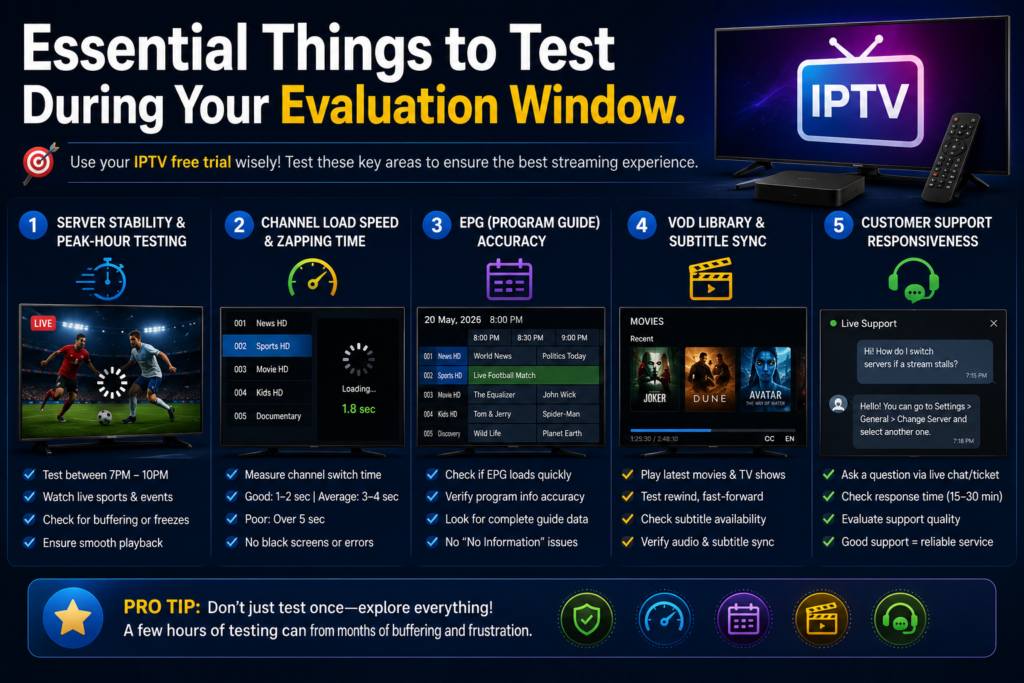
When your trial activation email lands in your inbox, the clock starts ticking. Do not waste your limited hours simply watching a movie you could stream anywhere else. Treat this window like a structured test.
1. Server Stability and Peak-Hour Stress Testing
The single most critical test is how the provider handles high-traffic times.
- Test Schedule: Run your primary tests between 7:00 PM and 10:00 PM in your local time zone.
- Live Events: If there is a major live football, basketball, or racing event broadcast live during your trial, turn it on. Live sports are notorious for forcing server buffering because thousands of users access the exact same stream simultaneously.
- Observation: Pay attention to whether the video freezes, stutters, drops in resolution, or requires manual channel re-selection.
2. Channel Load Speeds and Zapping Time
“Zapping time” refers to how long it takes for a video feed to launch after you select a channel from your guide.
- Good Performance: High-quality servers start playing channels within 1 to 2 seconds.
- Average Performance: 3 to 4 seconds.
- Poor Performance: Anything over 5 seconds, or channels that hang endlessly on a black screen before throwing a connection error.
3. EPG (Electronic Program Guide) Accuracy
A stream without a proper program guide feels chaotic. During your iptv free trial, open your player app’s guide view and check the following details:
- Are program names and time slots actually filled out, or does every channel say “No Information Available”?
- Are the program listings accurate to what is currently airing on the screen?
- Does the guide load quickly, or does it stall every time you scroll down through a group of channels?
4. Video-on-Demand (VOD) Library & Subtitle Sync
If the provider includes movies and TV series, test the VOD section thoroughly. Check if recent releases play smoothly, whether fast-forwarding and rewinding break the stream, and if multi-language audio or subtitle tracks are properly synchronized.
5. Customer Support Responsiveness
Send a simple technical question to the provider’s live chat or support ticket system during your trial period. Ask something straightforward, such as “How do I switch servers if a stream stalls?”
A provider that responds within 15 to 30 minutes with helpful guidance is far more likely to support you properly after you pay. If they ignore your message completely during a trial, expect zero help once they have your money.
How to Set Up an IPTV Free Trial Step-by-Step
Setting up your test playlist is straightforward once you understand the basic flow. Here is the exact process I follow whenever I evaluate a new service.
  Step 1: Prep Device & Install Player App (TiviMate, etc.)
                            │
                            ▼
  Step 2: Sign Up for Trial (Prefer No Credit Card Option)
                            │
                            ▼
  Step 3: Receive Credentials (URL, Username, Password)
                            │
                            ▼
  Step 4: Input Details into Player & Load Playlist
                            │
                            ▼
  Step 5: Run Evening Stress Tests & Evaluate Performance
Step 1: Prepare Your Device and Install a Dedicated App
Before requesting a trial link, get your hardware ready. While you can use a web browser or basic desktop player like VLC, dedicated streaming devices (such as an Amazon Firestick, Android TV box, or Smart TV) deliver the true living room experience.
Install a reputable player application beforehand. Excellent options include:
- TiviMate: The gold standard player for Android TV and Fire OS devices.
- IPTV Smarters Pro: Available on almost every platform, including iOS, Android, and Smart TVs.
- GSE Smart IPTV: Great option for Apple TV and iOS users.
- Ibo Player / XCIPTV: Reliable alternatives for older Smart TVs.
Step 2: Request Your Credentials
Visit the provider’s website and select their trial option.
Look for options explicitly offering an iptv free trial no credit card required setup. If a form asks for a credit card for a “free” test, be cautious. If payment details are mandatory for a small fee (such as a $1 test fee to prevent bot abuse), use a virtual credit card or privacy-focused burner card rather than your primary bank card.
Step 3: Input Credentials into Your Player App
Open your chosen player application and choose Add Playlist or Add User.
- Select Xtream Codes API as your login method (this is almost always cleaner and faster than pasting massive M3U links).
- Enter the Server URL exactly as written in your email (including port numbers like
:8080or:80if present). - Enter your assigned Username and Password.
- Click Add User or Login and allow 30 to 60 seconds for the application to pull channel lists and guide data from the server.
Detailed Player Setup Walkthroughs
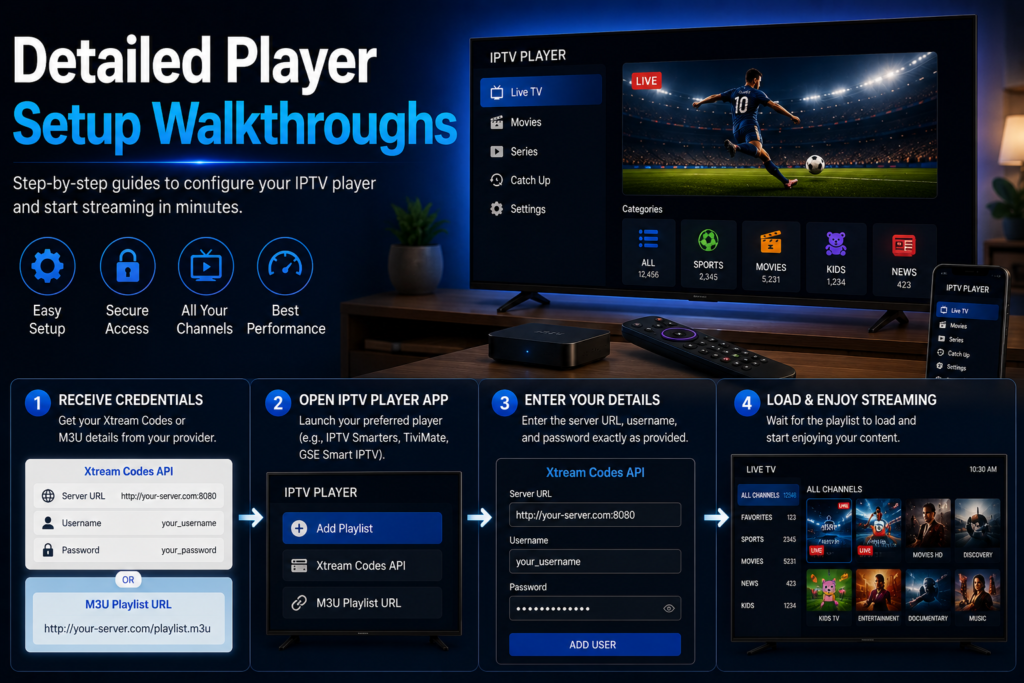
To ensure your iptv free trial runs smoothly, here are exact steps for setting up two of the most popular player applications in use today.
Setting Up TiviMate (Android TV / Firestick)
- Launch TiviMate on your device.
- Select Add Playlist.
- Choose Xtream Codes.
- Type in your Server URL, Username, and Password provided in your trial confirmation email.
- Check the box for Include VOD if you wish to import movies and series.
- Click Next, name your playlist (e.g., “Test Server 1”), and hit Done.
- Allow the EPG data to process before navigating channels.
Setting Up IPTV Smarters Pro (Multi-Platform)
- Open IPTV Smarters Pro.
- Click Load Your Playlist or File/URL or select Login with Xtream Codes API.
- Fill in the top field with any name you like.
- Enter the Username, Password, and Server URL into their respective boxes.
- Click Add User.
- Tap Live TV to start exploring available categories and feeds.
Recommended Hardware vs. Apps Matrix
Not all devices process stream decoding at the same speed. A weak streaming stick can make even the best server look bad due to local processing delays.
| Streaming Device | Processing Power | Recommended Player App | Overall Performance Score |
|---|---|---|---|
| NVIDIA Shield TV Pro | Excellent (Tegra X1+) | TiviMate Premium | 10 / 10 (Instant zapping, no lag) |
| Amazon Firestick 4K Max | Very Good (Quad-core) | TiviMate / IPTV Smarters | 9 / 10 (Smooth HD/4K playback) |
| Apple TV 4K | Excellent (A15 Bionic) | GSE Smart IPTV / iPlayTV | 9 / 10 (Extremely fast UI) |
| Chromecast with Google TV | Good (Quad-core) | TiviMate / Sparkle Player | 8 / 10 (Great value option) |
| Budget Android TV Box | Poor to Average | IPTV Smarters Pro | 5 / 10 (Frequent UI stutter) |
| Smart TV Native Apps | Low Memory | Ibo Player / SmartOne | 6 / 10 (Prone to memory crashes) |
If you encounter heavy lag or app crashes while running an iptv free trial, test the same playlist on a computer using VLC Media Player or on a smartphone first. This isolate whether the bottleneck is the provider’s server or your device’s memory.
How to Spot Red Flags and Avoid Trial Scams
While testing services is meant to save you money, there are dodgy operators out there who use trial offers as fishing hooks. Knowing what to avoid keeps your personal data safe.
                  SECURITY CHECKLIST FOR TRIALS
  ┌─────────────────────────────────────────────────────────┐
  │ [ ] No credit card required for 0.00$ trials            │
  │ [ ] Registration uses standard email input              │
  │ [ ] HTTPS padlock icon present on provider website      │
  │ [ ] No mandatory custom .APK file downloads             │
  │ [ ] Instant or automated email delivery of login details│
  └─────────────────────────────────────────────────────────┘
1. Demanding Credit Card Info for Free Tests
If a service advertises a 24-hour test for $0.00, but forces you to enter full credit card details, proceed with caution. Often, these sites trigger auto-renewing subscriptions the instant the 24 hours expire, making cancellation intentionally difficult. Look for providers that offer an iptv free trial no credit card required model whenever possible.
2. Forcing Unverified .APK Installations
Some providers insist that you download their proprietary custom app file (.APK) directly from an obscure URL instead of using established player applications like TiviMate or IPTV Smarters.
Custom APKs can sometimes contain bloatware, tracking scripts, or ad-injectors. A legitimate provider will always give you raw Xtream Codes or M3U playlist credentials that work in standard, official player apps.
3. Suspicious Payment Demands for “Free” Access
Watch out for services that state the trial is free, but then insist you pay a “processing fee” using cryptocurrency or non-refundable gift cards before sending credentials. A real trial should carry zero financial barrier to entry.
Troubleshooting Common Issues During Your Evaluation
Even on high-grade servers, technical hiccups happen. Before assuming a service is completely useless, run through these troubleshooting steps.
                     STREAM BUFFERING DIAGNOSIS
                                 │
                  Is buffering on ALL channels?
                 /                             \
               YES                             NO
               /                                 \
  Check Home Network & ISP             Isolated Server Issue
  • Run Speed Test                    • Try SD Channel Version
  • Restart Router                    • Switch H.264/HEVC Feed
  • Connect Ethernet Cable            • Contact Provider Support
  • Toggle VPN On/Off
Addressing Stream Buffering and Lag
If your video stutters or freezes constantly during your test, check the following points:
- Internet Stability Over Raw Speed: You do not need a gigabit connection for streaming. A stable, consistent 25 Mbps connection is far better than a 300 Mbps Wi-Fi connection that fluctuates constantly.
- Switch to a Wired Ethernet Cable: Wi-Fi interference from neighboring routers or household walls is a common cause of stream drops. Plugging an Ethernet cable directly into your device immediately removes Wi-Fi signal drops.
- Clear App Cache: Go to your device’s application settings, locate your player app, and click Clear Cache. Overfilled cache memory often causes random stuttering.
Dealing with ISP Throttling
Internet Service Providers (ISPs) often monitor network traffic patterns. When they detect continuous media streaming protocols during high-traffic evening hours, they may limit your connection speed to reduce overall network strain.
If your speed tests show 100 Mbps, but your iptv free trial buffers constantly at 8:00 PM, your ISP might be throttling your connection.
Pro Tip: Turn on a reputable Virtual Private Network (VPN) on your streaming device and re-test the channel. A VPN encrypts your traffic so your internet provider cannot see what data you are requesting, bypassing artificial bandwidth limits.
Frequently Asked Questions
What is the typical duration of an iptv free trial?
Most providers offer access lasting anywhere from 24 to 48 hours. Some services offer shorter 3- to 12-hour passes designed specifically for testing a single live match, while a few extend trials to 3 days over a weekend.
Do I need a VPN to run an iptv free trial?
While a VPN is not strictly mandatory to load a playlist, it is highly recommended. Using a VPN protects your online privacy and prevents your internet service provider from throttling streaming bandwidth during peak evening hours.
Can I test an iptv free trial on multiple devices at the same time?
Usually, no. Free test accounts are almost always hard-coded to allow only one active stream connection at a time. Trying to stream on both a living room TV and a smartphone simultaneously using trial credentials will likely result in immediate video freezing or account suspension.
Why do some channels load immediately while others stay black?
This usually points to a dead feed link on the provider’s server or a temporary regional stream outage. High-quality providers keep backup streams (often labeled as Backup or Alt) for major networks so viewers can switch feeds if a primary source goes down.
Will an iptv free trial work on an older Smart TV?
Yes, provided your Smart TV can install compatible player software like IPTV Smarters, SmartOne, or Ibo Player. However, older Smart TVs often have limited memory and slower processors, which can cause menu lag compared to using a dedicated device like a Firestick 4K or Apple TV.
Making the Most of Your Testing Experience
At the end of the day, taking full advantage of an iptv free trial comes down to timing and thoroughness. Do not request access five minutes before kickoff when you do not even have your player app installed yet.
Prepare your streaming box ahead of time, install a reliable player like TiviMate or IPTV Smarters Pro, and register for access when you have enough dedicated free time to actually run real-world stress tests.
Test during peak evening hours, switch between live television feeds and video-on-demand content, inspect the accuracy of the program guide, and check support response speeds.
By treating your trial as a systematic evaluation rather than just free entertainment, you will easily separate weak, unreliable servers from rock-solid providers, guaranteeing a smooth, buffer-free streaming experience for months to come.


One Response
[…] vast majority of live TV streams rely on the M3U or M3U8 format. “M3U” stands for Moving Picture Experts Group […]